

Add or Update Your Payment Method
Put a new credit card on file in the Parent Portal. It takes about 3 minutes, and nothing is charged when you save it.
Before you start
- Log in to the Parent Portal.
- Have your credit card handy.
- Saving a payment method does not charge it.
- 1
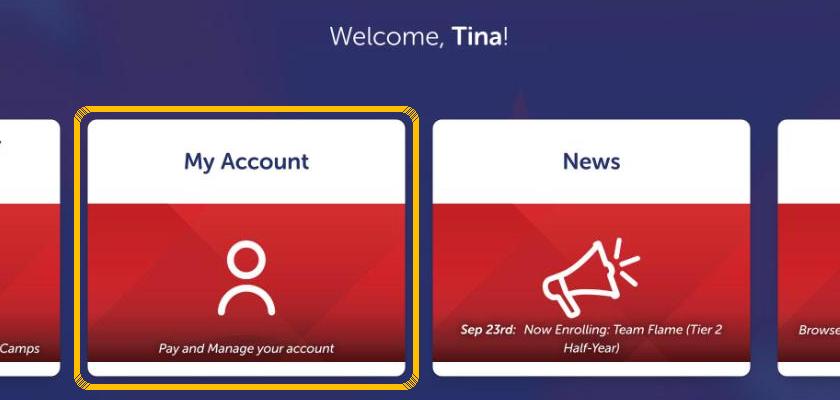
Tap My Account
After you log in to the Parent Portal, tap the My Account tile. You can also tap My Account in the top menu.
- 2
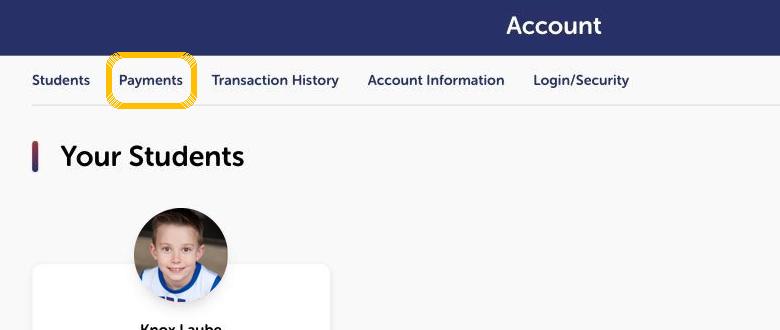
Tap the Payments tab
It is in the row of tabs at the top of your account page.
- 3
Tap Add Payment Method
Scroll to Stored Payment Information. Your saved cards and bank accounts show here. Tap the box that says Add Payment Method.
Updating a card that expired? Add the new card here and set it as your default. To remove an old one, tap the trash can on that card. - 4
Choose Credit Card, then tap Add
Pick Credit Card. Leave Set Default on Yes if this should be the payment method we use for your account.
- 5
Read the authorization and tap Confirm
This screen explains that your payment method can be used for recurring tuition. Confirm takes you to our secure payment form.
- 6
Enter your card details
Type your card number, expiration date (MM/YY), the security code from the back of the card, and the name on the card.
Enter your card only here. Never text or email your card number to anyone, including our staff. - 7
Add your billing address, then tap Save Details
Fill in the address your card statement goes to and tap Save Details. Your new payment method shows under Stored Payment Information.
Need to pay a balance?
When your account owes money, the Make Payment button at the top of the Payments tab turns on. Tap it to pay with the payment method on file.
Need help with your payment method?
The front desk can help you find the right screen. Enter payment details only in the secure Parent Portal.
(469) 828-6627Still Not Sure?
Tell Us About Your Athlete
Have a billing question? Send us a message and the front desk will help, usually the same day.